This site has quietly been running on old, migrated-from-a-CMS bones for a while: a theme wired up as a bit of a Frankenstein setup, some old posts stuck in a format nobody would choose on purpose, and a hosting setup that worked but that I hadn’t looked hard at in years. This week I finally cleared some time to go fix all of it, with an AI pairing partner doing a lot of the typing while I made the calls. Figured it was worth writing up, mostly for my own future reference.
Cleaning up the content itself
First pass was just tidying the writing platform. The theme had been wired in as an external dependency, which is fine until you need to actually patch a bug in it — then you’re stuck maintaining a fork you don’t control. So that got pulled in directly as regular, ordinary files in the repo. Boring, but the right kind of boring.
A big chunk of the older posts — the ones that trace back to a long-dead content management system from many years ago — were sitting in an inconsistent, awkward format compared to everything written since. Cleaning that up meant being careful about one thing in particular: none of those old posts’ URLs were allowed to change. Whatever links to them exist out in the world — search results, old bookmarks, whatever — needed to keep working exactly as before. So the fix was format-only, with the actual web address pinned in place explicitly for each one. Went through a full before-and-after comparison of every single page on the site to make sure nothing moved.
While in there, I also found a couple dozen old image links that were quietly broken — pointing at file paths from the old CMS that don’t exist anymore. Most were unfixable ghosts, dead forever. But a surprising number turned out to still exist on disk under a slightly different name, just never updated when things moved. Those got a proper fix instead of just accepting the rot.
The bigger project: how the site is actually served
This is the part that turned into a real weekend-project-in-an-evening kind of thing.
The old setup had the site’s storage sitting wide open to the public internet, with the content delivery network in front of it just reading directly from that open storage. This is a genuinely common way to do this — it’s what a lot of “how to host a static site” tutorials still show you — but it means the storage bucket itself has no real access control, it’s relying entirely on nobody looking. Not great.
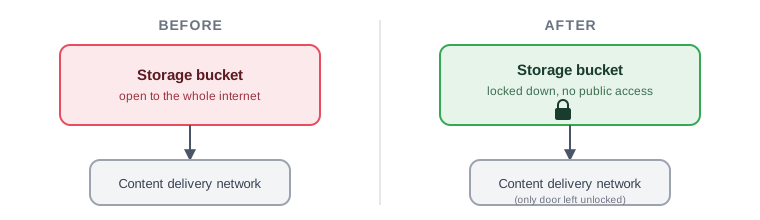
The fix is a well-known pattern: lock the storage down completely, and only let the content delivery network itself read from it, using a scoped, cryptographically-signed permission grant rather than “anyone who asks.” The storage bucket goes from zero access control to being unreachable by anyone except that one specific front door.
This sounds simple and is somewhat well-trodden, but of course there’s a gotcha nobody mentions until you hit it: the two serving methods handle missing pages completely differently. The old wide-open method automatically figures out that a folder-style web address means “look for the index page inside that folder.” The locked-down method doesn’t do that at all — it just doesn’t find anything if you don’t spell it out — so you need a small snippet of logic running at the network edge to fix the address on the way past. Same story for how it reports errors: a genuinely missing page comes back as a different, more suspicious-sounding error code under the locked-down setup, purely because it’s a more paranoid method by design, so the custom “page not found” page had to account for two error codes instead of one.
Also: dropped the “www”
While already touching all of this, I made the call to switch the site’s “real” address from the www.-prefixed one to the plain, bare version — apparently the more current convention, though it turns out to be genuinely a coin flip either way, not some hard rule I’d been getting wrong. The old prefixed address now just forwards along automatically, so nothing that ever linked to it breaks.
And finally: it publishes itself now
The last piece was making the whole “write a post, tell the internet about it” loop stop requiring me to manually push files around by hand. Now:
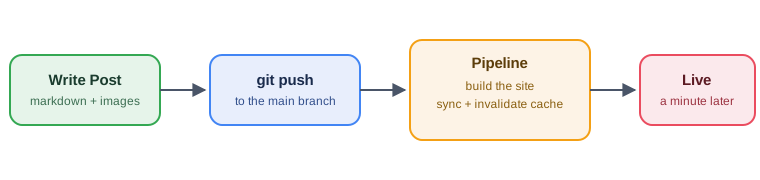
Push a change to the actual content, and a few minutes later it’s live — built, uploaded, and the cache cleared automatically. It’s specifically smart enough to not bother doing any of that if the only thing that changed was the automation’s own plumbing, which took a bit of fiddling with the trigger rules but was worth getting right — no point rebuilding the whole site because I tweaked a build script.
Along the way I hit the single most annoying failure of the whole project: a connection between the code host and the cloud side of things reported itself as fully ready to go, while quietly missing one actual authorization step behind the scenes. It just… didn’t mention that. Cost more time than everything else combined to figure out, and the eventual fix was “throw it away and very carefully do the setup wizard again, reading every screen this time.”
It’s all defined as code now, not clicked together
None of this infrastructure lives as manual clicks in a web console anymore — it’s all written down as actual code, checked into the same repository as the blog posts themselves. That sounds like a small distinction, but it changes the whole feel of maintaining it. A change gets proposed, you can see exactly what it will do to the real, live setup before it happens (a clean diff, not a guess), and applying it is one command instead of remembering which seventeen console screens to click through in which order. Undoing a mistake is “look at the previous version of the file,” not “hope you remember what the setting used to be.”
The practical payoff showed up immediately: the pipeline that now publishes this blog automatically took maybe an hour of actual back-and-forth to design, write, and get running — because the storage, the content delivery network, and the network-edge logic were already defined as code from the earlier work. Extending an existing, well-defined system is just faster than extending a pile of half-remembered manual configuration. Future me, or anyone else who ever needs to touch this, gets a readable history of why things are set up the way they are, not just that they are.
What does this actually cost
Worth saying plainly, because it’s easy to assume “cloud infrastructure” means a real ongoing bill: for a low-traffic personal blog like this, the honest answer is close enough to nothing to not think about. The pricing model behind all of this is pay-for-what-you-actually-use, not a flat subscription — storage priced by the gigabyte, the content delivery network priced by actual visitor traffic, the build pipeline priced by the minute only while a build is actually running. A personal blog with modest traffic and a handful of posts published a month barely registers against any of those meters, and several of the pieces involved have a genuinely free monthly allowance before any charge even starts.
The more interesting cost, if I’m honest, was never the infrastructure — it was the time spent understanding the gotchas well enough to set it up correctly and safely. The actual AWS bill for running this site is not a meaningful line item in anyone’s budget. That’s kind of the whole promise of this style of hosting: it scales down to “basically free” just as readily as it scales up.
Where that leaves things
Content’s cleaned up, the hosting is meaningfully more locked-down than it was, the canonical address is tidier, and publishing is now a non-event instead of a manual chore. None of this changes what you’re actually reading here — but it means there’s a lot less duct tape holding it up than there was last week, and that’s a satisfying kind of invisible progress.