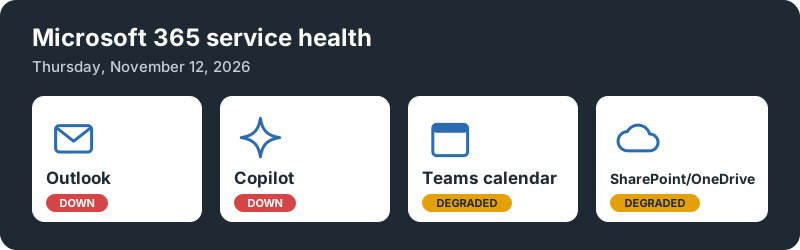
On Thursday, November 12, 2026, a large part of Microsoft 365 stopped working. Outlook took the biggest hit. Copilot, OneDrive and SharePoint went down with it. Teams and OneNote kept running, but anything that leaned on the Outlook calendar started to fail.
At its peak, Downdetector logged about 130,000 Outlook problem reports. By Friday, Microsoft reported broad recovery and explained what went wrong. Here is what happened, based on Microsoft’s own status updates and the coverage around them.
Update, November 13: Microsoft has named the cause: a problem from an earlier network capacity upgrade that surfaced after a recent network change. See What caused it .
How it started
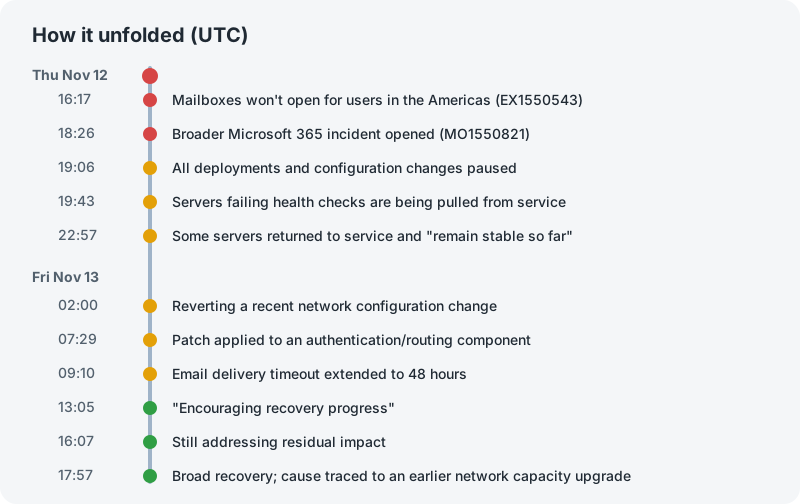
Around 16:17 UTC (11:17 AM Eastern), users in the Americas couldn’t open their mailboxes. Microsoft opened incident EX1550543 for Exchange Online. It said users were having trouble “through multiple connection methods in the Americas.”
That covered just about every way to reach your mail:
- Outlook on the web
- Outlook desktop
- Mobile mail apps
- The REST API that other apps use to read mail and calendars
The problem spread from there. Microsoft later said it “may affect Microsoft 365 service connectivity for users in any region.” At 18:26 UTC it opened a second, broader incident, MO1550821, for all the services that depend on Exchange Online.
There was a smaller warning sign earlier in the day. From 14:45 to 15:53 UTC, Teams had a separate incident (TM1550488) with delayed chat messages and presence status in the Americas. Microsoft blamed “resource contention” and closed it out. It isn’t clear yet whether the two are related.
Outlook: the center of it all

Outlook was the main event. For most of Thursday, a lot of people simply could not get to their mail. Microsoft’s updates walked through the problem in stages:
- Servers dropping out. Microsoft said the load “isn’t driven by an increase in traffic.” Servers were becoming “unexpectedly unavailable” and failing their automated health checks, so they were pulled from service. Fewer servers meant more load on the ones left.
- A process getting overwhelmed. Overnight, Microsoft narrowed it down. A process on the affected servers that sets up secure connections was getting overwhelmed. Once that happened, the server stopped handling requests.
- A configuration change. Microsoft then began reverting “a recent network configuration change that correlates with the start of impact.”
What caused it
On Friday, Microsoft gave a clearer answer:
The incident was introduced by an issue during an earlier network capacity upgrade that surfaced following a recent network change.
So two changes were involved. An earlier upgrade to add network capacity left a problem behind. It stayed hidden until a later network change brought it out. That explains why the recent change only “correlated” with the outage at first. It was the trigger, not the whole story.
Microsoft says it has “addressed the underlying issue.” It also said plainly that “this was a technical issue not related to cyber or AI / agents.” The full details will come in Microsoft’s post-incident report.
Mail wasn’t lost. It was delayed. On Friday morning Microsoft extended the email delivery timeout window to 48 hours. Messages that couldn’t be delivered right away would keep retrying instead of bouncing.
Teams and OneNote: caught by the calendar

Microsoft summed up the pattern in one line: “Features of the Microsoft 365 services below that interact with Exchange Online and email services are impacted.” Anything that didn’t touch Exchange kept working. Teams and OneNote are good examples of both sides.
Teams itself mostly worked. According to Microsoft’s update on MO1550821, “most of the core functionality including joining calls, meetings, group chats, and channel messages are not impacted.”
The trouble was the calendar. Teams doesn’t keep its own calendar. Your Teams meetings live in your Exchange mailbox, the same one Outlook uses. So when Exchange went down, Teams lost access to the calendar too. Microsoft listed these as possibly failing:
- Scheduling meetings and sending invites
- Viewing the calendar
- Editing existing meetings
- Creating Live or Virtual events
- Creating or deleting private and shared channels
- Adding or syncing contacts
OneNote ran into the same wall. OneNote can pull meeting details from your Outlook calendar into your notes. I tried it during the outage, and OneNote couldn’t bring in the calendar information for my meeting.
You could still join a call if you already had the link. You just couldn’t easily set up a new one.
SharePoint and OneDrive

Microsoft was clear that “accessing files stored directly in SharePoint Online remains functional.” The problems were in the features that depend on Exchange. Microsoft said some users “may experience issues when sharing SharePoint Online files with people outside their organization.” Sharing a file sends a notification, and that runs through Exchange.
OneDrive is built on SharePoint, so it was affected the same way. Users also saw problems with the recent files list in the Microsoft 365 apps.
Copilot

Copilot is only as good as what it can see. Microsoft said “users may be unable to load Copilot Chat or receive responses in the web and desktop apps.” Even when it did load, Copilot might not be able to reach your email, calendar or files. With Exchange down, that ruled out most of what people use Copilot for at work.
Everything else on the list
The outage reached further than the apps people use every day. Microsoft’s updates also mentioned:
- Microsoft Graph mail, calendar and contacts requests timing out
- Defender for Office 365 delays in policy checks
- Defender XDR and Purview portal pages
- Intune device enrollment, check-in and compliance policies
- Planner, To Do, Power BI and Universal Print
- Microsoft 365 Education features like Assignments and Reading Progress
- Windows 365 Cloud PCs for tenants using Purview Customer Key
- Power Apps mobile sign-in
- Parts of the Microsoft 365 admin center and the Apps Admin Center
That last one is a problem. When the admin center has trouble, admins lose the main place they’d go to check on the outage.
What Microsoft did about it
Microsoft’s fixes were mostly about buying back capacity while it hunted for the cause:
- Paused all deployments and configuration changes
- Moved US traffic off the affected servers and spread Outlook connections around the world
- Tested and rolled out a different health check method
- Restarted affected servers, then rebuilt some “using a previous software configuration”
- Throttled traffic in some locations
- Reverted the network configuration change
- Patched an “upstream authentication/routing configuration component”
Microsoft said on several updates that it had “no evidence of malicious activity associated with this incident.” This was not an attack.
By 13:05 UTC Friday, Microsoft reported “encouraging recovery progress.” At 17:57 UTC Friday, it was “seeing broad recovery and stability across our services” and was still restoring service to the remaining customers and regions.
Microsoft also explained why recovery took so long. “Given the scale of demand, we restored services gradually, validating stability at each stage. While this took longer, it helped ensure a stable restoration.” Bringing everything back at once could have knocked the servers over again.
The update opened with an apology: “We are deeply sorry for the disruption this incident has caused you and your business.”
Microsoft says it “will provide a full post-incident report once our review is complete.” I’ll update this post when that comes out.
If you run a Microsoft 365 tenant
A few things worth knowing for next time:
- Bookmark status.cloud.microsoft . It’s Microsoft’s public status page. It works even when the admin center doesn’t.
- Check Service health in the admin center. Go to Health > Service health and search for the incident IDs, in this case EX1550543 and MO1550821.
- Turn on Service health email alerts. Let the incidents come to you.
- Don’t change things during an outage. Reinstalling Office or resetting passwords won’t help, and it gives you one more thing to sort out later.
- Have a way to reach people outside Microsoft 365. If email and Teams are both down, you need another channel.
For Power Apps, Microsoft’s advice was simple. If you’re already signed in on mobile, don’t sign out, clear app data or reinstall until the issue is over. Use the web version if mobile sign-in fails.
Sources
- Microsoft 365 Service health status and its RSS feed (Microsoft)
- Office 365 Outlook and SharePoint seems to be unreachable today, Nov 12th 2026 (Microsoft Q&A)
- Massive Microsoft 365 outage disrupts Outlook, Teams, Copilot worldwide (BleepingComputer)
- Microsoft 365 Outage Disrupts Outlook, Exchange Online and Teams (SecurityWeek)
- Microsoft outage continues, Outlook and other 365 services down (CNBC)
- Microsoft 365 outage, 12 November 2026: what happened and what admins can do (Azure Blog)